

Software architecture, .NET
Drop The If-Else If You Want Better Code Quality and Higher Flexibility
If-else and switch cases are no different from hardcoded values.
Nicklas Millard
published July 24, 2024
Given the practically universal recognition of the importance of writing flexible, maintainable software, it’s natural to ask “Why do developers keep using traditional branching such as if-else statements?”
To begin with, if-else is part of any developer’s Programming 101 curriculum. Everybody learns it. It’s easy to implement (at first) and reads well (until more conditions are added).
However, after years of experience creating green field projects and maintaining other’s code, I’ve felt firsthand what a mess traditional branching causes and its crippling effect on velocity.
In terms of velocity: never measure productivity by the number of features you complete. Measure it by the features that stay done. It’s not done if you go back to add more to it.
Writing if-else and switch cases is the active avoidance of the hard work of analyzing and anticipating how your system will change throughout its lifetime.
The only reason for using else if, and switch cases is to make code easier to follow for junior developers, which is a bad idea as well–and code optimizations that we’ll never need.
Let’s look at some code that illustrates the issues and ways to solve them. Link to the github repository at the bottom of the article.
Introducing the problem.
It’s easy to bash traditional branching and say a few words on why it’s such a poor practice. But, how about some examples to drive the point home?
Keeping things simple, yet illustrative, imagine you’d have to develop a service that can generate different output formats for a given object type in a web application. The users can pick which format they’d like to have displayed.
In our example, let’s go with an Employee class that, to start with, you have to output as either JSON or XML.
Keep in mind, that what we’re building here doesn’t matter. Only the concepts, techniques, and approaches matter.

Easy enough.
You need the Employee class, an enum to select the OutputFormat and an EmployeeFormatter. Take a few seconds to read through the code below.
public class Employee
{
    public Employee() : this(Guid.NewGuid()) { }
    public Employee(Guid id) => Id = id;

    public Guid Id { get; }
    public required string Name { get; init; }
    public required DateOnly HiringDate { get; init; }
}

public enum OutputFormat
{
    Json,
    Xml,
}

public class EmployeeFormatter()
{
    // Used to get available formats in the front end
    public IReadOnlyList<string> GetAvailableFormats()
      => return Enum.GetNames(typeof(FormatOutput));

    public string Format(Employee employee, FormatOutput format)
    {
        if (format == OutputFormat.Json)
        {
            JsonSerializerOptions jsonOptions = new()
            {
                PropertyNamingPolicy = JsonNamingPolicy.CamelCase,
                WriteIndented = true
            };
            return JsonSerializer.Serialize(employee, jsonOptions);
        }
        else if (format == OutputFormat.Xml)
        {
            XmlWriterSettings xmlSettings = new()
            {
                Indent = true,
                NewLineChars = Environment.NewLine,
                NewLineHandling = NewLineHandling.Replace,
                OmitXmlDeclaration = false
            };
            EmployeeXml employeeXml = EmployeeXml.FromEmployee(employee);
            var xmlSerializer = new XmlSerializer(employeeXml.GetType());

            using var writer = new StringWriter();
            using var xmlWriter = XmlWriter.Create(writer, xmlSettings);
            xmlSerializer.Serialize(xmlWriter, employeeXml);

            return writer.ToString();
        }
        else
        {
            return "";
        }
    }

    /// <summary>
    /// This type is only used in the format == OutputFormat.Xml branch.
    /// </summary>
    [XmlType(typeName: "Employee")]
    public record EmployeeXml
    {
        [XmlElement]
        public Guid Id { get; set; }

        [XmlElement]
        public string Name { get; set; }

        [XmlElement]
        public DateTime HiringDate { get; set; }

        public static EmployeeXml FromEmployee(Employee employee)
        {
            return new EmployeeXml
            {
                Id = employee.Id,
                Name = employee.Name,
                HiringDate = new DateTime(employee.HiringDate, TimeOnly.MinValue)
            };
        }
    }
}
So, in the front end, we’ll use the method GetAvailableFormats to display which options the user can choose from. The Format(employee, outputFormat) is producing our formatted result.
Stripping the Format method from the branch implementations, we’re left with this:
public string Format(Employee employee, OutputFormat outputFormat)
{
    if (outputFormat == OutputFormat.Json)
    {
    }
    else if (outputFormat == OutputFormat.Xml)
    {
    }
    else
    {
    }
}
At this point, it’s simple to understand and not causing too many problems. Now, try to add yet another format and see what happens–say a PDF format.
public enum OutputFormat
{
    Json,
    Xml,
    Pdf // ← new
}

public string Format(Employee employee, OutputFormat outputFormat)
{
    if (outputFormat == OutputFormat.Json)
    {
      // json implementation
    }
    else if (outputFormat == OutputFormat.Xml)
    {
      // xml implementation
    }
    else if (outputFormat == OutputFormat.Pdf) // ← new
    {
      // pdf implementation
    }
    else
    {
    }
}
You had to modify code in multiple places, cyclomatic complexity increased, and you had to add more unit tests for the exact same method expecting wildly different output.
More importantly, this is an incredibly naive implementation approach. Guess what happens when you want to add another format, again, or, if you suddenly want to toggle formats on and off.
Attempting to reduce complexity with class extraction refactoring.
The slightly experienced junior developer might proclaim that there are some obvious refactoring techniques just begging to be applied, such as class extraction and refactoring to dependency injection.
So, let’s quickly attempt this and see how it affects our code quality. I’m not going to write out the full code but hopefully, the point comes across.
public interface IEmployeeFormatter {
  Format(Employee employee);
}

// Implementations omitted for brevity.
public class EmployeeJsonFormatter : IEmployeeFormatter {}
public class EmployeeXmlFormatter : IEmployeeFormatter {}
public class EmployeePdfFormatter : IEmployeeFormatter{}

public class EmployeeFormatter {
  public EmployeeFormatter(
            EmployeeJsonFormatter json,
            EmployeeXmlFormatter xml,
            EmployeePdfFormatter pdf) {
    // set fields
  }
}

public string Format(Employee employee, OutputFormat outputFormat)
{
    if (outputFormat == OutputFormat.Json)
    {
      return json.Format(employee);
    }
    else if (outputFormat == OutputFormat.Xml)
    {
      return xml.Format(employee)
    }
    else if (outputFormat == OutputFormat.Xml)
    {
      return pdf.Format(employee)
    }
    else
    {
      // something else
    }
}
Little has changed besides moving the actual formatting logic into separate classes — which certainly helps to keep the EmployeeFormatter “clean” and readable.
Have you noticed one very important characteristic of the code example above? Each dependency is only used a single time, in separate branches. We’ve effectively refactored to branch-coupled dependencies.
Also, our tests are suffering from null dependencies:
[Fact]
public void FormatEmployeeAsPdf()
{
    // Arrange
    var formatter = new PdfFormatter();
    var employee = new Employee
    {
        Name = "Faxe Kondi",
        HiringDate = new DateOnly(2023, 5, 20)
    };

    var sut = new EmployeeFormatter(
                    null, // ←
                    null, // ←
                   formatter // The only interesting dependency
              );

    // Act
    string result = sut.Format(employee, OutputFormat.Pdf);

    // Assert
    // some asserts
}
Notice that we’re passing two nulls to the EmployeeFormatter constructor. That’s for sure a code smell and makes some very brittle tests.
Collaborative scalability suffers as well.
I know many developers would be satisfied with this and claim the refactoring was a success.
However, think of the scenario where one developer has to add a new format and another developer works to allow formats to be toggled on and off without restarting the application.
Both developers decide to add new constructor arguments and new conditional requirements in the existing if-else statements. All tests that new up the EmployeeFormatter have to be adjusted and there’ll certainly be merge conflicts.
Tackling rigid conditional execution.
Alright, so extracting each branch into separate classes was a move in the right direction. Now it’s just a matter of getting rid of the if, else-if, else to allow for flexibility and extensibility.
To begin with, we’ll remove the enum OutputFormat and rather let each concrete “formatter” tell us which format they can output.
Take a minute to read through the changes below.
public interface IEmployeeFormatter
{
    string Format(Employee employee);
    string FormattingType { get; } // ← new
}

public class EmployeeFormatterManager(ILogger<EmployeeFormatterManager> logger)
{
    private readonly Dictionary<string, IEmployeeFormatter> formatters = [];

    public IReadOnlyList<string> GetAvailableFormats()
        => formatters.Select(kv => kv.Key).ToList();

    public string Format(Employee employee, string format)
    {
        bool hasFormatter = formatters.ContainsKey(format);
        return hasFormatter
            ? formatters[format].Format(employee)
            : throw new UnknownFormatException(format, GetAvailableFormats());
    }

    public EmployeeFormatterManager Add(IEmployeeFormatter formatter)
    {
        logger.LogEmployeeFormatterAdded(formatter.GetType(), formatter.FormattingType);

        formatters.Add(formatter.FormattingType, formatter);
        return this;
    }

    public EmployeeFormatterManager Add(IEnumerable<IEmployeeFormatter> employeeFormatters)
    {
        foreach (IEmployeeFormatter employeeFormatter in employeeFormatters) Add(employeeFormatter);
        return this;
    }
}

public class UnknownFormatException(string formatType, IEnumerable<string> availableFormats)
    : Exception($"Unknown type {formatType}. Available formats are: {string.Join(",", availableFormats)}");
Firstly, the “formatters” are stored in a dictionary along with the format they can handle.
Secondly, the GetAvailableFormats is still used to ask “Which formats do I have available?” However, this time, we don’t examine an enum but the actual formatters that are available. This is a more solid approach since you can easily add values to an enum without actually providing an execution path for them.
Thirdly, when formatting an employee to a string output, we don’t know at design-time which “formatter” is used, and frankly, the EmployeeFormatManager should not care anyway.
Adding new features without modifying existing code.
These changes allow flexibility and extensibility because you can add as many formats to the EmployeeFormatManager as you wish without modifying the code.
It’s so easy to add another feature (format) that it’s simply a matter if creating a new class and adding it to the EmployeeFormatManager.
public class EmployeeCsvFormatter : IEmployeeFormatter {
  public Format(Employee employee) {
    // implementation details
  }
}

// Some where else in the code
var csv = new EmployeeCsvFormatter();
manager.Add(csv)
manager.Format(someEmployee, "csv");
I know you’ll probably not use it like this in practice, but rather get the manager from an IoC Container — I’ll address this later in the article.
An affordance of well-structured code is how pleasant testing is. Since the EmployeeFormatterManager no longer relies on concrete implementations, we don’t have to instantiate those leaving us with no null constructor arguments.
// EmployeeFormatterManager test
[Fact]
public void ContainAddedFormatters()
{
    // Arrange
    var first = Substitute.For<IEmployeeFormatter>();
    first.FormattingType.Returns("first");

    var second = Substitute.For<IEmployeeFormatter>();
    second.FormattingType.Returns("second");

    EmployeeFormatterManager sut = new EmployeeFormatterManager(NullLogger<EmployeeFormatterManager>.Instance)
        .Add(first)
        .Add(second);

    // Act
    IReadOnlyList<string> result = sut.GetAvailableFormats();

    // Assert
    result.Should().Contain(["first", "second"]);
}
Likewise, each “formatter” is testable in its own right as it’s no longer an implementation detail of another class’ execution paths (if, else-if, else).
// EmployeeJsonFormatter test
[Fact]
public void FormatEmployee()
{
    var employee = new Employee(Guid.Parse("f9e827ab-29aa-4a50-92a1-3688c6a4b9fe"))
    {
        Name = "Faxe Kondi",
        HiringDate = new DateOnly(2023, 5, 1)
    };

    var sut = new EmployeeJsonFormatter();

    // Act
    string result = sut.Format(employee);

    // Assert
    // language=json <- allows highlighting in JetBrains IDEs
    const string expectedJson = """
                                {
                                  "id": "f9e827ab-29aa-4a50-92a1-3688c6a4b9fe",
                                  "name": "Faxe Kondi",
                                  "hiringDate": "2023-05-01"
                                }
                                """;
    result.Should().BeEquivalentTo(expectedJson);
}
Touching on collaborative scalability, other developers can bring their format implementations that may reside in different projects as long as they implement the IEmployeeFormatter interface.
Toggling features at runtime.
Now, say there’s a new requirement from the business and we’re tasked to enable and disable specific formats at runtime without having to recompile and deploy the application.
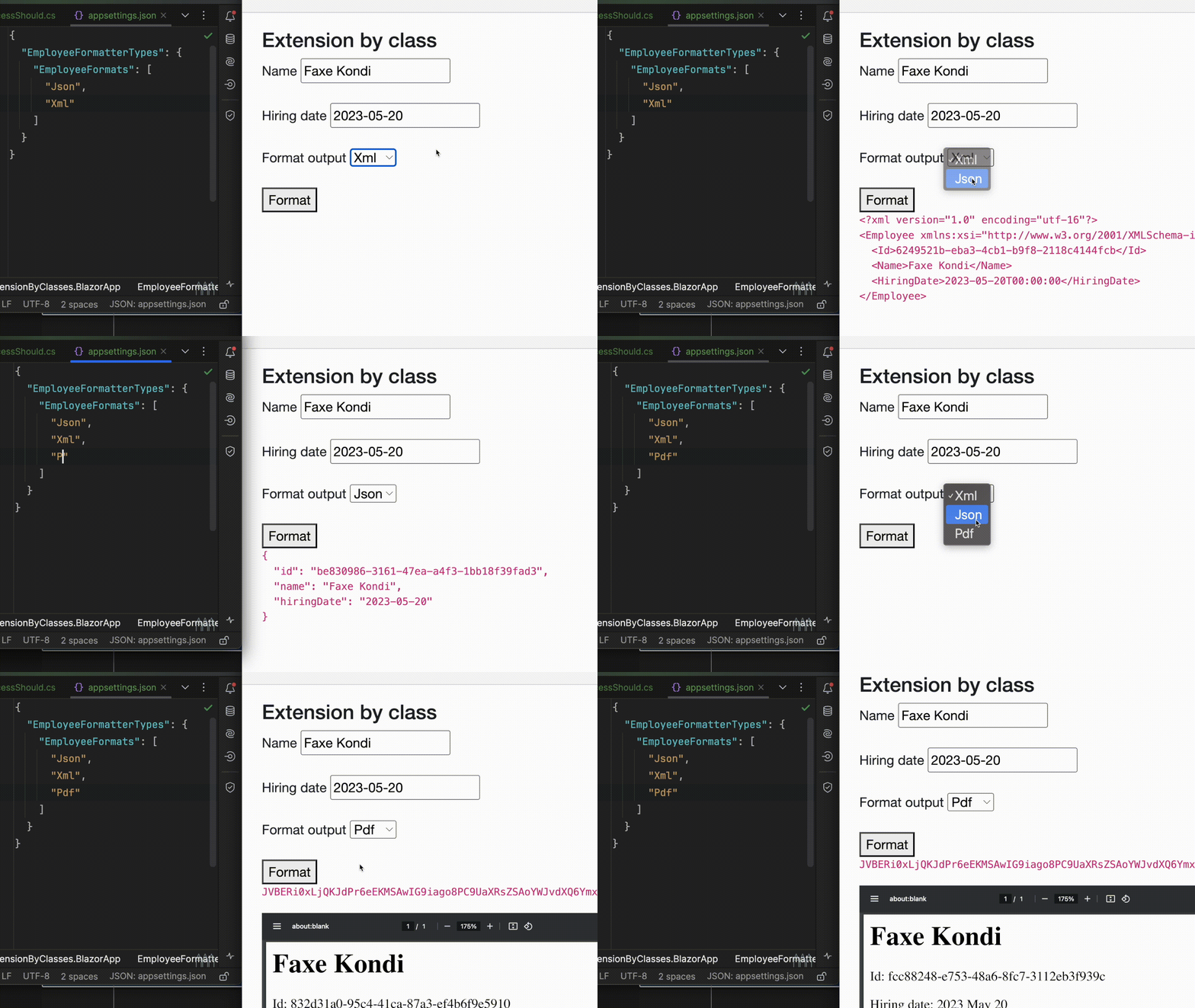
The traditional branch-based approach would require modifying an existing class and updating all its associated tests.
The implementation would go something like this:
public class EmployeeFormatter(IOptionsMonitor<AvaiableFormatOptions> options)
{
    public IReadOnlyList<string> GetAvailableFormats()
    {
        return Enum.GetNames(typeof(OutputFormat))
            .Where(of => options.CurrentValue.EmployeeFormats.Contains(of))
            .ToList();
    }

  public string Format(Employee employee, OutputFormat outputFormat)
  {
      bool unknownFormat = !GetAvailableFormats().Contains(outputFormat.ToString());
      if (unknownFormat) return "";

      if (outputFormat == OutputFormat.Json)
      {
         // json
      }
      else if (outputFormat == OutputFormat.Xml)
      {
        // xml
      } else if (outputFormat == OutputFormat.Pdf)
      {
        // pdf
      }
      else
      {
          return "";
      }
  }
}
Not too bad, but it’s easy to see how quickly this gets unmanageable. Also, we still allow formats that don’t actually have an implementation which may cause bugs that way.
There are no code changes to the updated version which relies on adding concrete formatters in contrast to the hardcoded execution paths. Everything stays the same.
Configuring the EmployeeFormatManager using Dependency injection Framework.
So, I promised to get back to how we enable this flexibility using an IoC Container. The approach is not unique to C# .NET and is easily replicated with other languages.
In dotnet, this is possible with Microsoft.Extensions.DependencyInjection library which is already shipped with the aspnetcore framework.
// appsettings.json
{
  "EmployeeFormatterTypes": {
      "EmployeeFormats": [
        "Json",
        "Xml",
        "Pdf"
      ]
    }
 }
// Program.cs (aspnetcore app)
builder.Services
    .Configure<EmployeeFormatterTypes>(
        builder.Configuration.GetSection(nameof(EmployeeFormatterTypes))
    );

builder.Services
    .AddSingleton<IEmployeeFormatter, EmployeeXmlFormatter>()
    .AddSingleton<IEmployeeFormatter, EmployeeJsonFormatter>()
    .AddSingleton<IEmployeeFormatter, EmployeePdfFormatter>()
    .AddScoped<EmployeeFormatterManager>(provider =>
    {
        var logger = provider.GetRequiredService<ILogger<EmployeeFormatterManager>>();
        var options = provider.GetRequiredService<IOptionsMonitor<EmployeeFormatterTypes>>();

        IEnumerable<IEmployeeFormatter> formatters = provider.GetServices<IEmployeeFormatter>()
            .Where(ef => options.CurrentValue.EmployeeFormats.Contains(ef.FormattingType));

        return new EmployeeFormatterManager(logger).Add(formatters);
    });
In this way, every time an EmployeeFormatManager is requested, we check which formats are available in the appsettings.json, find the concrete formatters and only add them to the manager.
We have changed the problem of adding another feature from being one of hardcoding a new execution path to effectively being a matter of configuration.
Resources for the curious
Let's Stay in touch
You're always welcome to reach out at nicklas@mjukvare.com!